
Today I want to introduce you guys a robust forex scalping system and it is not other than “Instant Profit Scalping“. It is a pure scalping forex trading strategy designed for the true scalpers. Simple yet genuine, Instant Profit Scalping is one of my favorite scalping systems. Instant Profit Forex Scalping System works in 5-minute and 15-minute time frames but I do not recommend this system on the 1-minute time frame. As you are a scalper, be selective regarding the currency pairs. Cross pairs tend to have bigger spreads compared to majors.
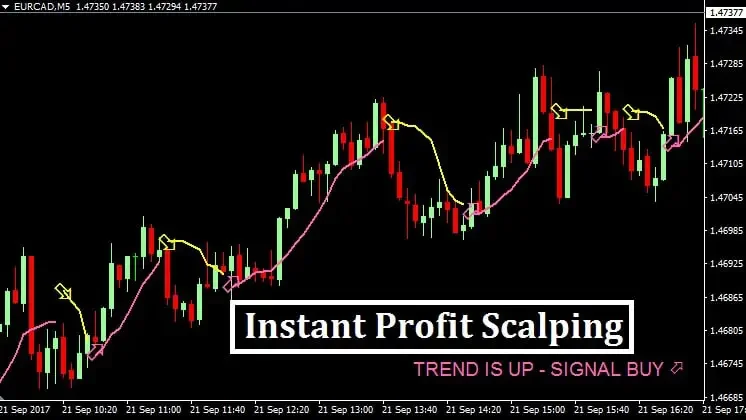
It certainly is a scalping system but it is also a trend following system. Which means you will be scalping along with the direction of the major trend. Bear in mind that you should trade only in the direction of the trend, not in the counter-trend direction. When you are done with installing Instant Profit Scalping System in your MetaTrader 4, your chart should look like this:
Instant Profit Scalping System Overview
| Time Frame | Currency Pairs | Number of Indicators | Rating |
| M5 and M15 | Majors | 2 | 9.6/10 |
Now, let’s go through the indicators used in Instant Profit Scalping.
Instant Profit Scalping Indicators Overview

| Main Chart |
| Instant Profit Scalping Line |
| Instant Profit Scalping Arrows |
- Instant Profit Scalping Line
It is a moving average alike indicator that you see in the main chart window. When this indicator is pink, it indicates strong bullish momentum in the market and when this indicator is yellow, it indicates strong bearish momentum.
- Instant Profit Scalping Arrows
Instant profit scalping arrows are the yellow and pink arrows that you see at the reversals. A pink arrow suggests long position while a yellow arrow suggests short position.
Instant Profit Scalping: Buy Parameters

- The general direction of the forex pair should be up.
- The market should be around the support region.
- A pink arrow (Instant Profit Scalping Arrows) should appear below the market.
- Instant Profit Scalping Line should be pink.
- Execute your buy position when above parameters are met.
- Keep your stop loss below the latest support level.
- Book your profit when you see a yellow arrow (Instant Profit Scalping Arrows) above the market.
Want to Know About: Forex Pattern 123 Indicator MT4
Instant Profit Scalping: Sell Parameters

- The market should be around the resistance region.
- A yellow arrow (Instant Profit Scalping Arrows) should appear above the market.
- Instant Profit Scalping Line should be yellow.
- Execute your sell position when above parameters are met.
- Keep your stop loss above the latest resistance level.
- Book your profit when you see a pink arrow (Instant Profit Scalping Arrows) below the market.



I have downloaded Instant Profit Scalping but the following Indicators are missing ???
Instant Profit Scalping Line
Instant Profit Scalping Arrows
Where can I get the Link for proper Indicators
There are these Indicators only
Click Ctrl+N>Right Click> Refresh. Load the template. Done! It worked perfectly for me! Please refresh the indicator panel!